# CodeMirror Indentation Markers

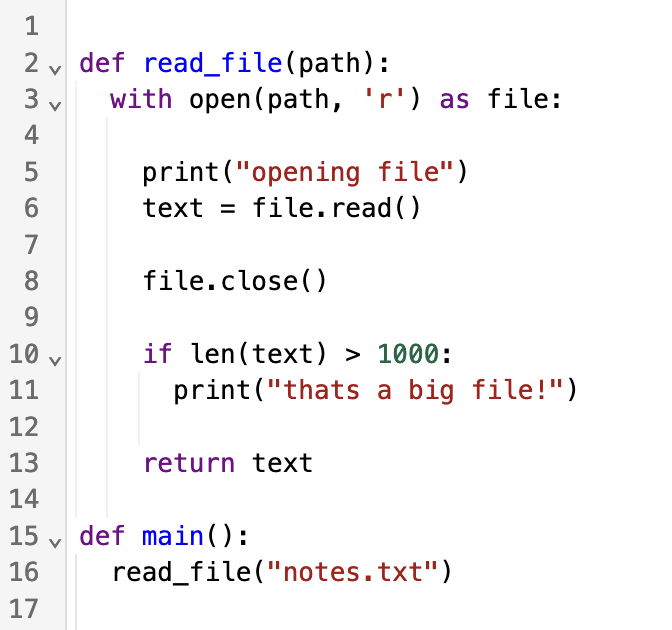
 A CodeMirror extension that renders indentation markers using a
heuristic similar to what other popular editors, like Ace and Monaco, use.
### Usage
```ts
import { basicSetup } from 'codemirror';
import { EditorState } from '@codemirror/state';
import { EditorView } from '@codemirror/view';
import { indentationMarkers } from '@replit/codemirror-indentation-markers';
const doc = `
def max(a, b):
if a > b:
return a
else:
return b
`
new EditorView({
state: EditorState.create({
doc,
extensions: [basicSetup, indentationMarkers()],
}),
parent: document.querySelector('#editor'),
});
```
### Options
You can provide an options object to `indentationMarkers()` with the following
optional properties:
- `highlightActiveBlock`
Boolean that determines whether the active block marker is styled
differently. Setting this to `false` provides a significant performance
enhancement because it means that markers do not need to be regenerated
when the selection changes. Defaults to `true`.
- `hideFirstIndent`
Boolean that determines whether markers in the first column are omitted.
Defaults to `false`.
- `markerType`
String that determines how far the indentation markers extend. `"fullScope"` indicates that the markers extend down the full height of a scope. With the `"codeOnly"` option, indentation markers terminate at the last nonempty line in a scope. Defaults to `"fullScope"`.
- `thickness`
Integer that determines the thickness in pixels of the indentation markers. Defaults to `1`.
- `activeThickness`
Integer that determines the thickness in pixels of the active indentation markers. If `undefined` or `null` then `thickness` will be used. Defaults to `undefined`.
- `colors`
Object that determines the colors of the indentation markers.
- `light`
String that determines the color of the markers when the editor has a light theme. Defaults to `#F0F1F2`.
- `dark`
String that determines the color of the markers when the editor has a dark theme. Defaults to `#2B3245`.
- `activeLight`
String that determines the color of the active block marker when the editor has a light theme. Only applies if `highlightActiveBlock` is `true`. Defaults to `#E4E5E6`.
- `activeDark`
String that determines the color of the active block marker when the editor has a dark theme. Only applies if `highlightActiveBlock` is `true`. Defaults to `#3C445C`.
#### Example
```ts
new EditorView({
state: EditorState.create({
doc,
extensions: [
basicSetup,
indentationMarkers({
highlightActiveBlock: false,
hideFirstIndent: true,
markerType: "codeOnly",
thickness: 2,
colors: {
light: 'LightBlue',
dark: 'DarkBlue',
activeLight: 'LightGreen',
activeDark: 'DarkGreen',
}
})
],
}),
parent: document.querySelector('#editor'),
});
```
A CodeMirror extension that renders indentation markers using a
heuristic similar to what other popular editors, like Ace and Monaco, use.

### Usage
```ts
import { basicSetup } from 'codemirror';
import { EditorState } from '@codemirror/state';
import { EditorView } from '@codemirror/view';
import { indentationMarkers } from '@replit/codemirror-indentation-markers';
const doc = `
def max(a, b):
if a > b:
return a
else:
return b
`
new EditorView({
state: EditorState.create({
doc,
extensions: [basicSetup, indentationMarkers()],
}),
parent: document.querySelector('#editor'),
});
```
### Options
You can provide an options object to `indentationMarkers()` with the following
optional properties:
- `highlightActiveBlock`
Boolean that determines whether the active block marker is styled
differently. Setting this to `false` provides a significant performance
enhancement because it means that markers do not need to be regenerated
when the selection changes. Defaults to `true`.
- `hideFirstIndent`
Boolean that determines whether markers in the first column are omitted.
Defaults to `false`.
- `markerType`
String that determines how far the indentation markers extend. `"fullScope"` indicates that the markers extend down the full height of a scope. With the `"codeOnly"` option, indentation markers terminate at the last nonempty line in a scope. Defaults to `"fullScope"`.
- `thickness`
Integer that determines the thickness in pixels of the indentation markers. Defaults to `1`.
- `activeThickness`
Integer that determines the thickness in pixels of the active indentation markers. If `undefined` or `null` then `thickness` will be used. Defaults to `undefined`.
- `colors`
Object that determines the colors of the indentation markers.
- `light`
String that determines the color of the markers when the editor has a light theme. Defaults to `#F0F1F2`.
- `dark`
String that determines the color of the markers when the editor has a dark theme. Defaults to `#2B3245`.
- `activeLight`
String that determines the color of the active block marker when the editor has a light theme. Only applies if `highlightActiveBlock` is `true`. Defaults to `#E4E5E6`.
- `activeDark`
String that determines the color of the active block marker when the editor has a dark theme. Only applies if `highlightActiveBlock` is `true`. Defaults to `#3C445C`.
#### Example
```ts
new EditorView({
state: EditorState.create({
doc,
extensions: [
basicSetup,
indentationMarkers({
highlightActiveBlock: false,
hideFirstIndent: true,
markerType: "codeOnly",
thickness: 2,
colors: {
light: 'LightBlue',
dark: 'DarkBlue',
activeLight: 'LightGreen',
activeDark: 'DarkGreen',
}
})
],
}),
parent: document.querySelector('#editor'),
});
```