Exclude a secured section of a document
This document will walk you through Excluding a section of an Infinity Vault document to which you may no longer have access.
Review
If you are not familiar with Document Security and its associated permissions, please review Infinity Vault Concepts - Document Security
Introduction
When working on a document in a collaborative environment, where more than one participant has adequate permissions, it can occur that a participant may remove all other participants access (Read, Write, Grant) to a section of the document. If access is not going to be granted to the section again in the future, you may wish to remove that section from the document.
Excluding a Secure Section from an Infinity Vault document should be considered permanent for all participants including those that might still have adequate permisisons to that section. It will be removed and unless referenced by another document, should be considered unrecoverable.
Important
Excluding a section of a document should be considered destructive; once excluded, the section of the document will no longer be accessible.
Excluding a Secure Section
To exclude a Secure Section from an Infinity Vault document, you must have the Apply and Exclude Document Security permissions for that document. In most cases, you will have the Apply and Grant permissions but may not have Exclude.
To verify the current Document Security permissions, Open the document and Enable Security Editor mode, Save the document, then click the  button.
With the Infinity Vault Security Styles screen open, click the  button to open the Manage Document Security screen.
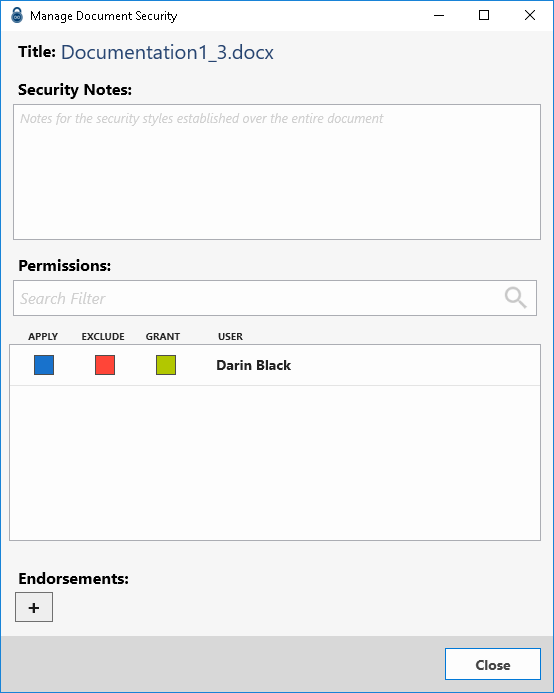
As shown in the above screen shot, ensure that the Exclude permission is selected then click the  button to apply the permission change.
Click the  in the Infinity Vault Security Styles screen.
To ensure the document level security is updated, select File | Save or click the  icon to save the Infinity Vault Document.
Carefully select the section of the document you wish to exclude.
With the section selected, click the button to re-open the Infinity Vault Security Styles screen. The  should now be enabled.
Keeping in mind that there is no undo, click the button to exclude the section from the document.
Click the button to close the Infinity Vault Security Styles screen and click the  to close the Security Editor Palette.
The section should no longer be visible in the document.
Summary
Excluding a Secure Section of an Infinity Vault document is possible but should not be taken lightly. With the steps above, you should now be able to permanently exclude a Secure Section of an Infinity Vault document.